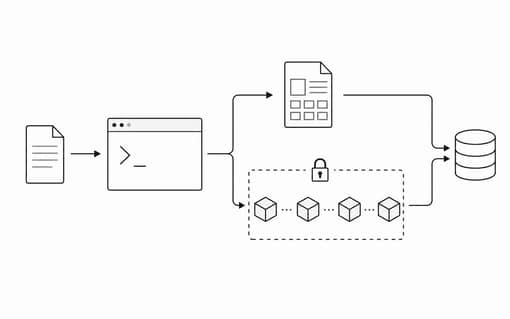
Secret is a short-lived sharing system for private text and files. The product model is intentionally small: clients encrypt data locally, the API stores only ciphertext and lifecycle metadata, and the final access URL keeps the decryption secret in the browser-only hash fragment.
portal or cli
  -> secret-cipher: local encryption and access-url encoding
  -> edge api: ciphertext, read tokens, tracking, expiration
  -> recipient: decrypts locally with /s/{readId}#{accessSecret}
This means the web portal and terminal client share the same security
boundary. The terminal is just another client: it prepares encrypted payloads
with secret-cipher, sends ciphertext to the API, and prints read
links plus a tracking link.
Use Secret from a terminal
If you only want to try Secret, run npx secret without installing
it. The same command can create text secrets, create file secrets, and tune read
limits or expiration time for a quick test.
# Create a text secret without installing.
npx secret

# Create 3 read links that expire in 15 minutes.
npx secret --links 3 --expiration 900

# Create a file secret for a quick test.
npx secret -f ./incident-notes.txt

# Create a file secret with 5 read links and a 1 hour TTL.
npx secret -f ./archive.zip --links 5 --expiration 3600
The main command prompts for the secret value, encrypts it locally, creates one or more read links, and saves enough local tracking metadata for later status checks.
For regular use, install the CLI globally with
npm i secret -G, then run secret directly from any
terminal.
# Install for repeated use.
npm i secret -G

# Create a text secret after installing.
secret

# Create a file secret after installing.
secret -f ./incident-notes.txt

# Create 3 read links that expire in 15 minutes.
secret --links 3 --expiration 900
Files use the same model with chunk encryption and encrypted file metadata. The API receives encrypted bytes and never sees the original filename, content, or decryption key in plaintext.
Reveal and track
A recipient can reveal a text or file secret from the full URL. Text is printed to the terminal. Files first show encrypted manifest details after local decryption, then ask before downloading and decrypting the object.
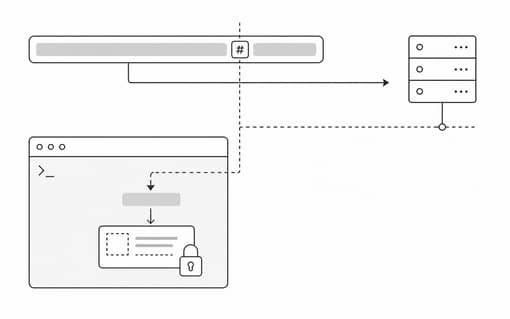
secret reveal 'https://secret.witt.im/s/read_123#access_secret'

# The CLI also accepts the compact readId.secret form.
secret reveal 'read_123.access_secret'
The sender receives a separate tracking link and a track id. Use it to inspect whether a secret is still ready, consumed, expired, or destroyed.
secret track track_123
secret status
Self-host origins
Self-hosted users can point the CLI at their own API and portal origins. The API origin is where ciphertext is created, read, tracked, and cleaned up. The portal origin is used when the CLI prints browser-readable access and tracking URLs.
secret config \
  --api https://secret-api.example.com \
  --portal https://secret.example.com

# Local development hosts are normalized to http.
secret config --api localhost:3001 --portal localhost:3000
Origins are normalized before saving. A host without a protocol defaults to https, except localhost-style hosts, which default to
http. The config is stored in the user home directory under
.secret-cli/config.
Agent
An agent can operate the Secret CLI or a custom command-line client, but you should not let an agent handle the plaintext. A core reason to use Secret is to keep sensitive information away from third parties. Once a secret is placed in a prompt, tool argument, or agent-readable file, it has already crossed Secret's security boundary and may appear in conversation history, tool traces, logs, archives, backups, or provider storage. Client-side encryption and a zero-knowledge server cannot undo that disclosure.
Recent incidents show how easily apparently limited sharing can expand. In July 2026, publicly shared Claude conversations surfaced in Google Search; reporting described cryptocurrency keys and personal details among the exposed material. In July 2025, shared ChatGPT conversations were also indexed by search engines; OpenAI ended the discoverability experiment because people could accidentally share information they did not intend to make public. These incidents affected conversations whose users had created public share links, not private chats that had never been shared, but they show why a transcript containing a secret should never be treated as a safe vault.
The safest default is to run secret yourself and enter sensitive
values only at its local prompt. Avoid asking an agent to call
secret, passing secrets through prompts or tool arguments, or
letting an agent read files containing them. If automation is unavoidable,
design the workflow so the agent can trigger only an audited local wrapper
while the plaintext is supplied out of band and never enters the agent
context.
Build your own CLI
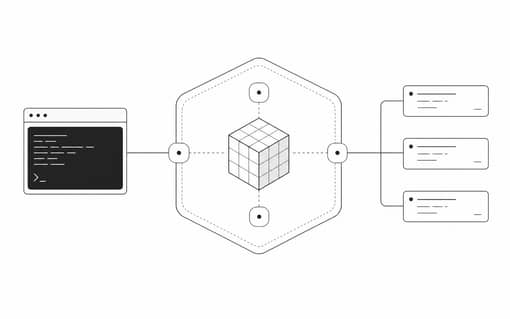
If you need to publish your own Secret-compatible command line tool, start with packages/secret-cipher/README.md. The package is the stable boundary for local encryption, decryption, and access URL encoding.
-
Install
secret-cipherand usesealText,openText,encodeTextAccessUrl, and the file helpers as your cryptographic core. - Implement API calls that store ciphertext, request read ids, complete file uploads, load tracking state, and fetch encrypted payloads.
-
Add an origin configuration command equivalent to
secret config --api --portalso self-hosted users can target their own deployment. - Rename the package and binary for your distribution, remove private package metadata, then build and publish through your usual npm release process.
import { encodeTextAccessUrl, openText, sealText } from 'secret-cipher'

const sealed = await sealText('private text')
const url = encodeTextAccessUrl({
  origin: 'https://secret.example.com',
  readId: 'read_123',
  secret: sealed.secret,
})

const text = await openText(sealed)